
 vincent | 2 months ago | 12 comments | 2 likes | 259 views
liuyongcai and songbaojin like this!
Michiel, would it be possible to have in the futur a batch processing to backup all shows from a folder based on the "save show + media files" as it is done for the BixPacks ?
This would allow us to save only the media used.


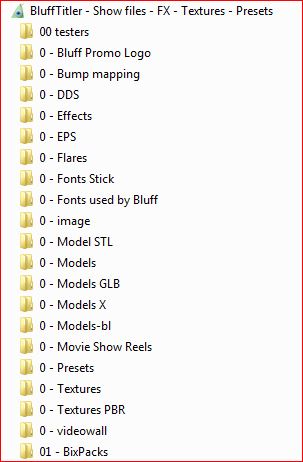
I already do that but in a round about way. You probably know that if you save with the option:
"Save Show + all media files . ."
to a folder then all everything in that show is saved in the relevant folders.
I made another Bluff Folder group for myself which has ALL Bluff related files in it, it like my library.

lightads, 2 months ago
Yes i know the option, actually I'd like a procedure that automates this option "Save Show + all media files..." for all shows in a directory.
vincent, 2 months ago
The danger is that you end up with all your shows in one folder.
The FILE > SAVE SHOW + ALL MEDIA FILES... option is great for compiling a template pack or for posting a show in this community, but I think it's less useful for storage. I prefer to store my models in the folder D:\Media\3DModels with lots of subfolders to prevent it gets too big. I have similar folders for textures, vectors, audio and other media files. This makes it also easier to use them in other apps. And making a backup is as easy as copying the D:\Media folder.

michiel, 2 months ago
Too bad !
Ok. Each method has its advantages and disadvantages. It is not a danger because I was thinking of this for ARCHIVING not for storing as DATA for futur use.
Like this i store all and only the necessary media, It looks a lot of better method for me for this case.
The method you recommend is the one I currently use, but I end up with a lot of unused media.
I'll try to manage to make a small program.
vincent, 2 months ago
Be careful with this because restructuring the folder hierarchy is a good way to break projects. Files in different folders, but with the same name do not necessarily have to be identical. Apps start picking the wrong ones, resulting in chaos...
In version control systems you can make tags, which is a label for a specific point in history.
But it can be done much simpler: stop updating a backup, write the date on the external disk and you have your archive!
michiel, 2 months ago
I must have made myself unclear, because it's not about restructuring the folders or changing names, but simply copying the shows and their media into a folder, as you do for Bixpacks and store on external hd.
vincent, 2 months ago
Same problem: what to do when 2 shows use 2 different files from 2 different folders but with the same name? That's doable when compiling a BixPack, but when you start processing thousands of shows it will drive you insane.
michiel, 2 months ago
< < < i solved my problem > > >
I wrote a program, It seems to be working correctly. I had a few surprises with special URLs and other issues, but I think it's good now.
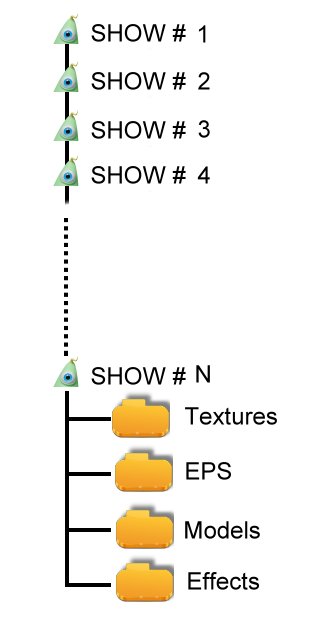
I store just folders EPS, Textures, Models.
I tested it on 200 shows and didn't get any duplicates (The fact that I have a file for each year limits the risk).
Even if it happens occasionally, it won't be a major problem, and at worst, I might add an error log to check for shows that could cause problems.
------------------post-------------
I'd be lying if I said it never happens, but I think it's not a so frequent occurrence.
Personally, I store shows by year to limit the number of shows in a directory, which further reduces this risk by making a backup of the year YYYY.
For example, next January I'll create a 2025 folder containing all the shows from 2025 and start with an empty "current" folder.
The main problem is the model folders which grows and eventually contains a bunch of unused files that take up space for nothing.
It's to be able to clean up this directory that I'd like to back up the shows along with their media.
I will run a test on a large number of files to count the number of false duplicates.
vincent, 2 months ago
I think this concept will interest you. With bi-directional links you know immediately which show files use this model file:
michiel, a month ago
Euh, I think I'm going to need a massage after reading that.
Over the years I've accumulated around 14,000 GLB files, representing 220GB, and that doesn't even include the .obj and .x files.
I did a quick test with year in 2025 : I used 825 models, 668 of which were GLB files.
Hence the urgency for me to sort through them.
vincent, a month ago
The implementation might be difficult and probably practically impossible, but the idea is very simple. If bi-directional links were implemented at Windows level, you could right click on a model file and get a list of all the files, including the BT files, that refer to this model. And when it was implemented at web level we could see which sites refer to a picture, a web page or even a text phrase. Bi-directional links are very powerful.
668 of 14.000 is less than 5%. But does this mean that the other 95% can be ignored in your archives? Please be careful. Do not underestimate asset management.
michiel, a month ago