Dick (FOV) | 2 hours ago | 24 views
I have installed the 14-day trial version of Magic Automa AI.
I am exploring the additional possibilities it offers, particularly in combination with BluffTitler.
I am pleasantly surprised to find that large parts of BluffTitler can indeed be automated using macros, without the need to rely on error-prone screen coordinates.
This is possible because the program utilizes the so-called "AutomationID" of BluffTitler's UI controls.
Consequently, all menu commands (with or without keyboard shortcuts) and many input fields can be used within macros.
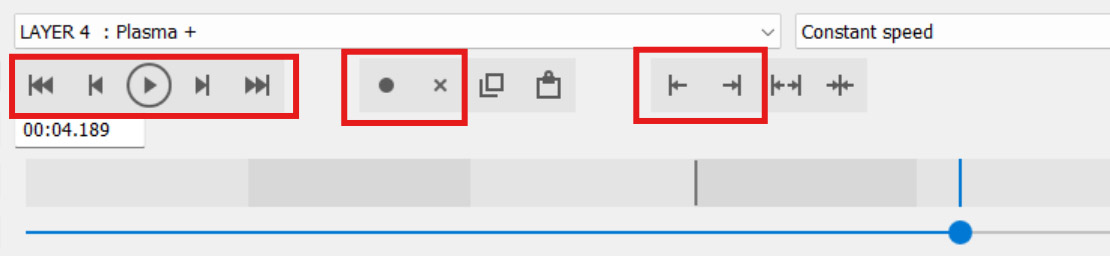
However, none of the controls related to keyframes
can be found in the BluffTitler menus, nor do they have keyboard shortcuts or AutomationIDs. It appears they can only be used in macros via simulated mouse movements based on coordinates. Macros would be particularly useful for keyframe operations (e.g., loading a complex keyframe curve with the single press of a macro button).
Request: Please assign a unique "AutomationID" to the BluffTitler keyframe
buttons—specifically "Create key," "Delete key," "Move left,", "Move right", "First key", "Previous key", "Play", "Next key" and "Last key" — so that these buttons can also be automated within macros without relying on screen coordinates.
Presumably, Magic Automa AI would not even need to be modified for this (?); I expect it to work immediately via the "BluffTitler UI control" feature.