
 bambamD | 3 hours ago | 2 comments | 3 likes | 59 views
Tintin, michiel and Alex-Raymond T. like this!
know that on SketchFab exist much better 3d objects, but wanted my own whatever ok or ugly they are.


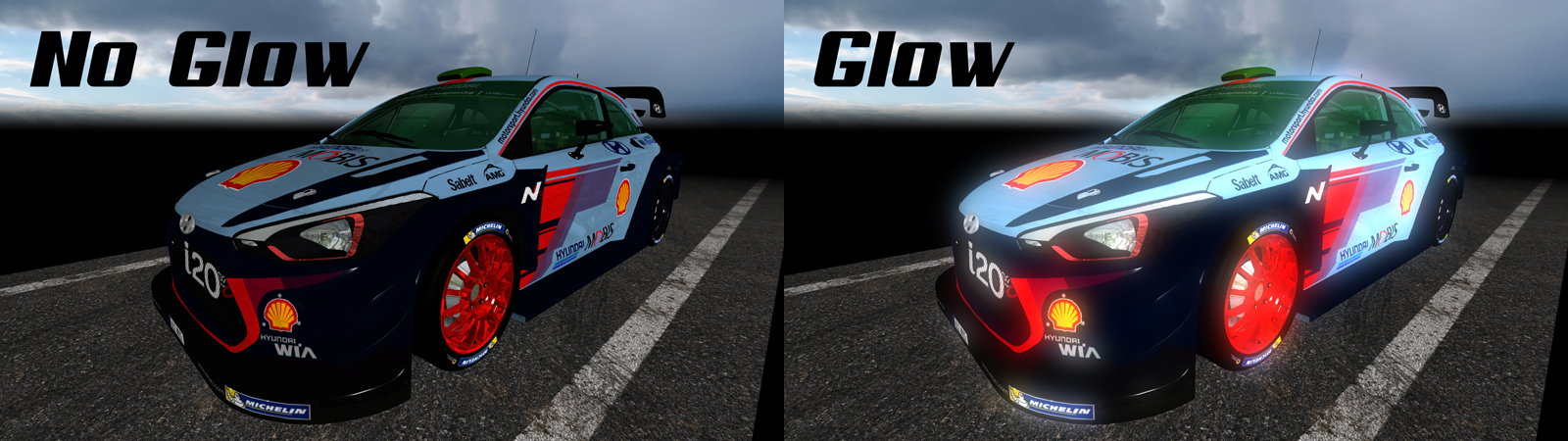
The easiest way to make models look better is to apply glow: choose LAYER > ACTIVE LAYER PROPERTIES... and mark the GLOW checkbox. This works best with a dark background, so do not apply glow to the road.
Model used:
sketchfab.com...

michiel, 56 minutes ago
Comment to this article
More by bambamD



















About bambamD
I am partner in my wife company XtraX 5G, teacher and open for suggestions and have will to share my knowledge in filming industry. Working with Bluff since 2010! But didn't learned all compatibilities that this program can make, also doing render WITH IClone reallusion and I am member of The CGBros, Yamaha and music Planet then Filmora Squad Leader Top Level.
84 articles 30.0K views
Contact bambamD by using the comment form on this page or at dgorjan@gmail.com