
 bambamD | a year ago | 8 comments | 1 like | 439 views
songbaojin likes this!
how to make visible my 360 photo inside sphere, need help


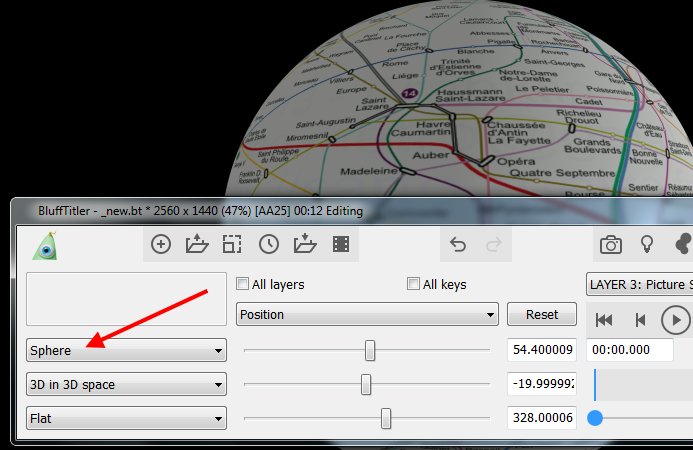
Maybe using Sphere shape from the picture layer then you make sure the camera is inside the sphere.

vincent, a year ago
yes understand, used in my Cleopatra 2, both ok, but how to export that as model?
bambamD, a year ago
The current GLB model format (glTF 2.0) does not feature a skybox, so this is unfortunately technically impossible.

michiel, a year ago
1) if you use sphere shape with a glb-compatible texture just use EXPORT AS MODEL.
vincent, a year ago
This is true Vincent, but a sphere used as a skybox must always be rendered at the camera position. The GLB format does not understand this.
michiel, a year ago
BambamD, I tried to explain that this is impossible.
The GLB format simply does not support it.
You can export a textured sphere, but that's not the same as a skybox. A skybox is always rendered at the camera position. The GLB format can't do that.
michiel, a year ago
Comment to this article
More by bambamD























About bambamD
I am partner in my wife company JirehPrinting Advertisement marketing 5G, and CEO of WillsenStudios SZUM and Immersive-X, teacher opened for suggestions and have will to share my knowledge in filming industry. Working with Bluff since 2010! But didn't learned all what this program can make, also doing render With IClone Reallusion and I am member of The CGBros, Yamaha and music Planet then Filmora X.
108 articles 44.8K views
Contact bambamD by using the comment form on this page or at dgorjan@gmail.com