 Jeep35 | 7 months ago | 2 comments | 320 views
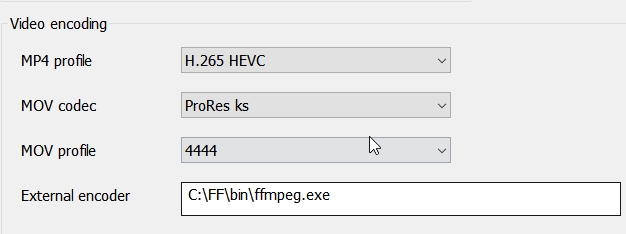
If you need to save your shows with alpha chanel included to import them in DaVinci Resolve, the best is to use the QuickTime codec ProRes 4444.
Of course, you must have FFmpeg installed on your PC. You will indicate the path of its installation as shown on the capture according to its path on YOUR PC.
Si vous souhaitez sortir vos réalisations en vidéo avec canal alpha pour les importer dans DaVinci Resolve, le mieux est d'utiliser le codec QuickTime ProRes 4444.
Vous devrez avoir FFmpeg installé sur votre PC. Vous indiquerez le chemin de son installation comme montré sur la capture en fonction du chemin sur VOTRE PC


Comment to this article
More by Jeep35








About Jeep35
83 articles 156.2K views
Contact Jeep35 by using the comment form on this page or at jeep@breizhbleu.org