 Thor5ten | 2 days ago | 12 comments | 7 likes | 252 views
Zhang Guiru, bambamD, Tintin and 4 others like this!
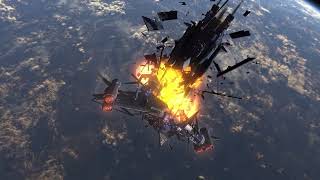
Expanding 3D explosion cloud. Apply this effect to the voxel layer. The cloud is generated by the effect (no simulation) and depends only on the props, so you can keyframe everything. Use the FX EXPANSION prop for the size of the cloud: 0 is a tiny spark, 1 fills the voxel cube. Use the FX HEAT prop for the temperature: 1 is a glowing fireball, 0 is cold smoke. Usually you animate both together, for example expansion 0 to 1 while heat goes from 1 to 0. Use the FX DENSITY prop for the opacity of the cloud. The cloud is built from slices, so with fewer slices (VOXEL RESOLUTION prop) you need a higher density, with more slices a lower density. Use the FX TURBULENCE, FX NOISE SCALE and FX NOISE SEED props to shape the cloud and the FX EMISSION and FX SMOKE COLOUR props for the colours. Set the SIZE prop of the voxel layer to the same value for all three sliders to get a round cloud. Use the COLOUR prop of the voxel layer to choose the colours of the cloud: white gives a classic fire, any other colour builds the whole palette (cold smoke, glow and hot core) from that colour, for example green for an alien cloud. The FX SMOKE COLOUR prop is the colour of the cold smoke and is tinted by the COLOUR prop. The TRANSPARENCY prop fades the cloud out. The TISSUE DENSITY prop of the voxel layer is not used by this effect.
Unlike sprite based particle effects this voxel effect has true 3D volume and can be rotated or the camera can orbit around it like in the YT video above.
Test if your graphics card can manage higher voxel resolution values. If not, keep them a bit lower.
Vibe coded with the help of Claude AI.
Download media files (19 KB)


What a great idea. sounds complex.
Filip, 2 days ago
Thank you Filip. You can study the included test show to get a better understanding. In short: If you set all the FX prop parameters to the max, you will get a nice explosion plume. 😉
Thor5ten, 2 days ago
Impressive!
Yes, graphics cards are not built for rendering voxels. BluffTitler simply renders a lot of planes (use the VOXEL RESOLUTION prop to control this), which is slow if you do not have a serious gaming machine. I think this effect can be optimized by using a bigger part of the texture. Even when you set the FX EXPANSION prop to 1, only about 20% is used. All the rest is transparent (or almost transparent), but still eats processing power.
The goal is to make effects that look impressive without requiring impressive hardware. AI can understand the latter, but has trouble with the former so needs a human to optimize this ratio.

michiel, 2 days ago

Thank you LostBoyz, vincent and michiel.
@michiel: Claude would like to greet you and responded well to your suggestion. 😀
I've already updated the effect file enclosed here. Please download the files again.
Here is the optimization the AI built in: The voxel layer draws many slices through the whole cube, which is slow. At FX EXPANSION 1 the cloud fills the whole cube. With the FX OPTIMIZE prop set to 1 only the part of the cube is drawn that the cloud currently needs, so small clouds are much cheaper. Set the SIZE prop of the voxel layer so that the cube is as large as the largest cloud you need, and use the lowest VOXEL RESOLUTION prop value that still looks good. Set FX OPTIMIZE to 0 if you see any artifacts.
Thor5ten, 2 days ago
Thor5ten, thanks for the update!
The voxel layer generates a cube with edges of 200. So the coordinates go from -100 to 100. Maybe that's the info Claude needs to know.
If a pixel is fully transparent it does not mean that it does not require any computations. The trick is to find out as soon as possible that the pixel is going to be fully transparent.
Also there's a difference between fully transparent and humans perceiving it as fully transparent. So a threshold can help optimizing the algorithm.
michiel, a day ago
Vincent, thank you for the request!
Realize that only the relative depth bias matters, so in many cases you can fix the sorting issue by adjusting the depth bias of one of the the other layers.
michiel, a day ago
Michiel, in the above video in this article i have only 2 Voxel layers and a Skybox so i can't set an other type.
I was experimenting Thor5ten filter to create clouds.

vincent, 23 hours ago
Super creative idea to use the smoke as clouds. Looks amazing. The sorting problem might really be voxel layer related.
Thor5ten, 17 hours ago