
 michiel | 8 months ago | 3 comments | 7 likes | 793 views
Ilja, xuelianghua, Tintin and 4 others like this!
Here's a question that is asked a lot by e-mail: does BluffTitler support my language?
The answer is yes, but only when the font you have selected supports it.
Some apps, including Windows itself, automatically switch to a replacement font when a glyph is not supported by the selected font.
There are 4 problems with this:
1) it gives you the false idea that the font you have selected supports your language
2) mixing fonts results in bad design (only the missing glyphs use the replacement font)
3) kerning looks terrible
4) the result can look very different on another computer because the replacement font can be different
For this reason BluffTitler does not automatically use a replacement font for the missing glyphs.
To find out which fonts support your language:
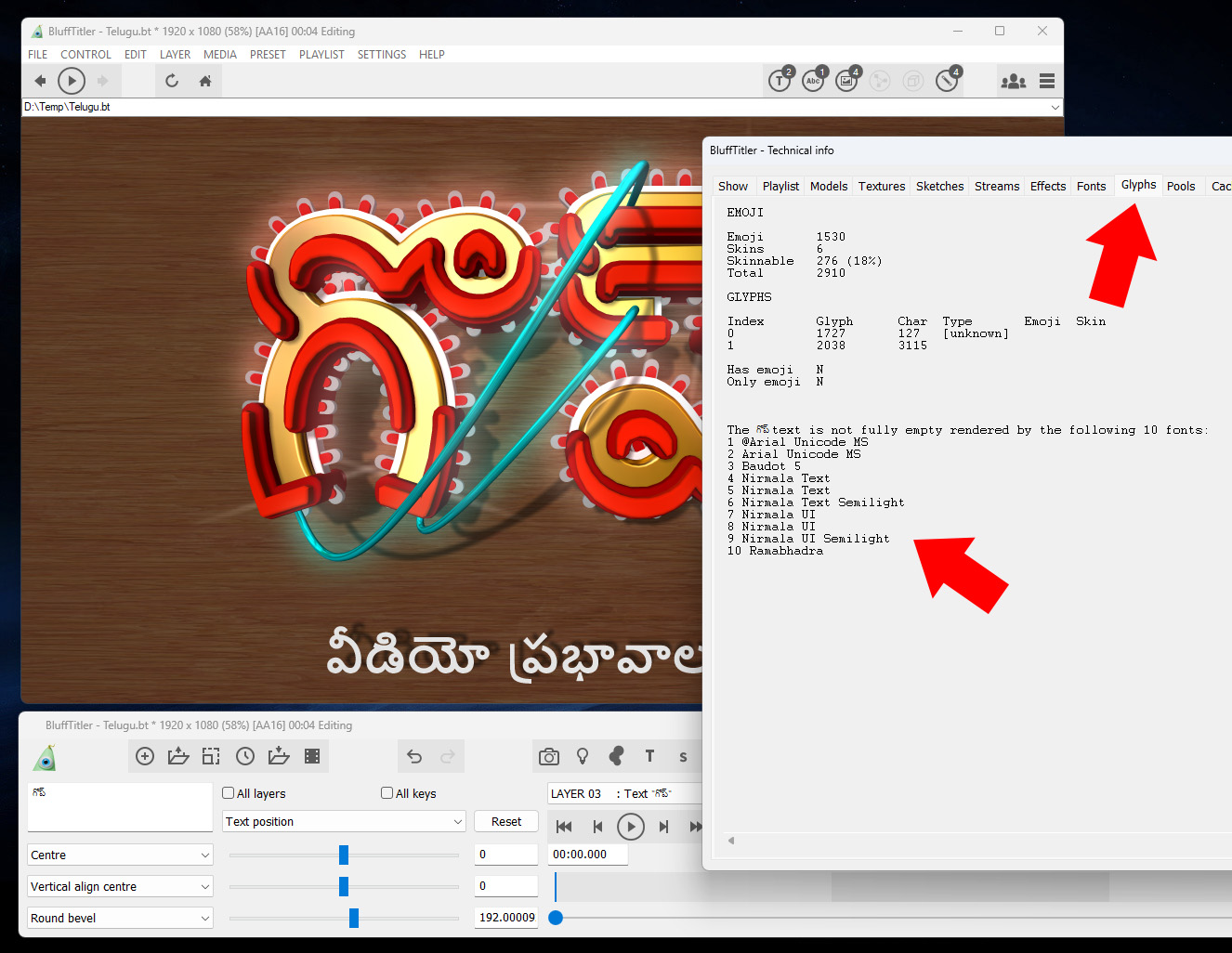
-select a text layer
-enter a text with with only 1 or 2 characters
-press <Ctrl><F1>
-select the Glyphs tab
As you can see in the screenshot, in this example only 10 fonts support the entered text.
This <Ctrl><F1> debug window is not meant for normal use. Maybe we should add a "find a font for my text" menu item or something.


The screenshot has been made with a beta version. It uses new features, like the directional stroke and the connecting lines that are not yet available in the current version.
michiel, 8 months ago
Oh, and please please please use this community to ask questions. This way other users can learn from your questions as well.
Thank you!
michiel, 8 months ago

Comment to this article
More by michiel





















About michiel
Michiel den Outer is the founder and lead coder of Outerspace Software. He lives in Rotterdam, the Netherlands.
If he isn't busy improving BluffTitler, he is playing the piano or rides the Dutch dikes on his bikes.
890 articles 4.8M views
Contact michiel by using the comment form on this page or at info@outerspace-software.com