
 michiel | 5 months ago | 8 comments | 7 likes | 696 views
Ilja, liuyongcai, xuelianghua and 4 others like this!
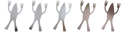
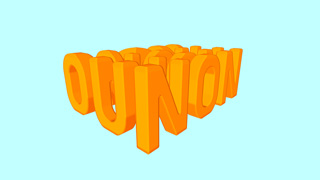
Version 17.0.0.3 introduces CAPS props in the Text\AscenderBender effect.
CAPS stands for capitalization. With those props you can make the first, middle and last characters of every line a bit bigger.
FX CAP SIZE Y
With this prop you set the relative height of the first (1st slider), middle (2nd slider) and last characters (3rd slider).
The neutral value is 1.
Use the PIVOT POINT prop to set the origin.
FX CAP SIZE Z
With this prop you set the relative depth of the first (1st slider), middle (2nd slider) and last characters (3rd slider).
FX CAP LENGTH
With this prop you set the number of characters that are affected. In this screenshot it is set to 2 to not only increase the letter B but also the wing glyph.
EFFECTS
More about using effects in the user guide:
outerspace-software.com...
GLYPHS
More about wing glyphs here:
outerspace-software.com...
DOWNLOAD
The latest version of the AscenderBender effect comes with version 17.0.0.3:
outerspace-software.com...


The ascenderBender effect is a VERY powerful effect. BixPack 37 | Wings explored its power:
michiel, 5 months ago

NICE!
Filip, 5 months ago


Intetesting effect ! It's a shame the effect doesn't work on the attached border.

vincent, 5 months ago
Thank you all!
Vincent, apply the Text\AscenderBender effect to the attached layer as well.
michiel, 5 months ago
Michiel,
Of course, that's a solution but it requires repeating the settings on all attached layers.
vincent, 5 months ago
Comment to this article
More by michiel










About michiel
Michiel den Outer is the founder and lead coder of Outerspace Software. He lives in Rotterdam, the Netherlands.
If he isn't busy improving BluffTitler, he is playing the piano or rides the Dutch dikes on his bikes.
890 articles 4.8M views
Contact michiel by using the comment form on this page or at info@outerspace-software.com