 michiel | a year ago | 29 comments | 13 likes | 1.5K views
bambamD, Ilja, chaver and 10 others like this!
A Sus pointed out, the camera should not only move but also rotate when exporting as a VR 360° video:
outerspace-software.com...
This is fixed in version 16.7.7.3, launched today:
outerspace-software.com...
As you can see in the video this works great with roller coasters! The show is based on this template:
outerspace-software.com...
Car model used:
sketchfab.com...
More about VR 360° export:
outerspace-software.com...
As always, download the latest version from the download page:
outerspace-software.com...


Wow looks great. And again a nice improvement.
Filip, a year ago

Version 16.7.7.3 fixes export VR 360° video
xuelianghua, a year ago
Thanks a lot Michiel !!
Blufftitler certainly also shines in VR.
Sus, a year ago
merci michiel = awesome, much appreciated
Rorysee, a year ago
Very nice feature.
During playback is there a way to navigate the camera using keyboard keys? I'd like to screen capture playback moments but don't want mouse cursor in the capture.
lightads, a year ago
Lightads, I don't know if the YouTube player supports keyboard control. Realize that the VR 360° aspect is removed when you do a screen capture. Why don't you animate the camera in BluffTitler? All the media links are in the description. This way you can also use your own car by selecting a nice one on Sketchfab:
michiel, a year ago
Thanks Michel
Linko, a year ago

can somebody help me to do faster my creativity, will be mentioned in credits intro outro, need this show but camera in center with 4 eps empty frames so I can add videos in each side, front, rear, left, right and 2 eps, one bellow and one above? Please?

bambamD, a year ago
BambamD, that's equal to the 6 faces of a cube. All faces are equal, except for their POSITION and ROTATION props:
The front face is at (0, 0, 100) with rotation (0, 0, 0)
The right face is at (100, 0, 0) with rotation (90, 0, 0)
The back face is at (0, 0, -100) with rotation (180, 0, 0)
The left face is at (-100, 0, 0) with rotation (-90, 0, 0)
The top face is at (0, 100, 0) with rotation (0, -90, 0)
The bottom face is at (0, -100, 0) with rotation (0, 90, 0)
The distance (100 in this example) depends on the size of your layer.
michiel, a year ago
Sus, nice scene, but it looks like you've forgotten to run the Spatial Media Metadata Injector tool before uploading to YouTube:
michiel, a year ago
Oeps ..forgotten indeed.
(my Pico videoviewer does not need it so I never used it)
Sus, a year ago
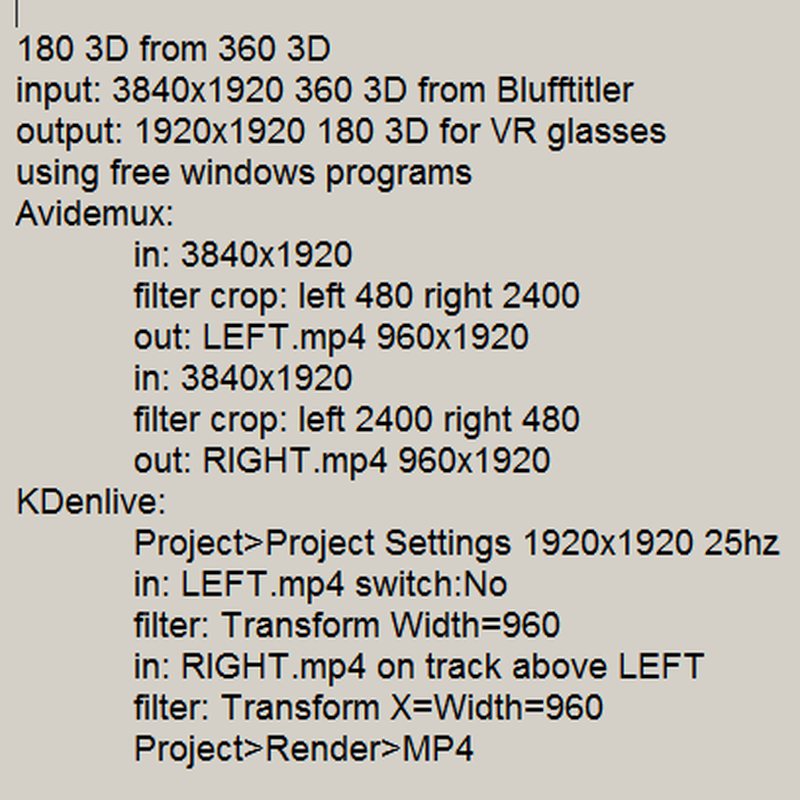
Added picture documents the method I use to extract a 180 3DVR from the 360 3DVR generated by Blufftitler.
There must be lots of different ways and easier ones too but this one works for me :)
Sus, a year ago
Sus, setting the FX SIZE prop of the VR 360° layer to (0.5, 1) gives you a VR 180° output.
michiel, a year ago
Michiel you make my day with your super tip !!!
The Matrix style stuff is actualy one of YOUR example shows!
Sus, a year ago
Here we go using your fast and easy method.
Super !
Sus, a year ago
Sus, I am puzzled by your comments. What I am seeing in your latest video is the PUPIL DISTANCE prop of the camera layer.
michiel, a year ago
Sus, cool result. What pupil distance have you chosen? The user guide isn't specifying, if this value is measured in mm, cm or percentages (up to 100?).

Thor5ten, a year ago
Michiel it is a 180 3D video as used on VR glasses. Instead of the long procedure I mentioned before I used your super tip.
I used pupil distance 1 to get a natural look.
I tried 6 and 60 but this gives extreem displacement. Standard interocular distance is 6cm as you certainly know.
Sus, a year ago
Just like the POSITION prop, the PUPIL DISTANCE prop is in world units. So this not only depends on the distance between your eyes (6.4 cm in my case) but also on the size of the world.
michiel, 11 months ago
Strange behavior witnessed: a Ctrl-Z under Windows does sometimes undelete all actions on a layer and not just the last one ...
Sus, 11 months ago
Sus, can you provide step by step instructions how to reproduce the issue?
And please make it a separate post, thank you!
michiel, 11 months ago

Comment to this article
More by michiel


















About michiel
Michiel den Outer is the founder and lead coder of Outerspace Software. He lives in Rotterdam, the Netherlands.
If he isn't busy improving BluffTitler, he is playing the piano or rides the Dutch dikes on his bikes.
890 articles 4.8M views
Contact michiel by using the comment form on this page or at info@outerspace-software.com